Friday, 4 August 2017

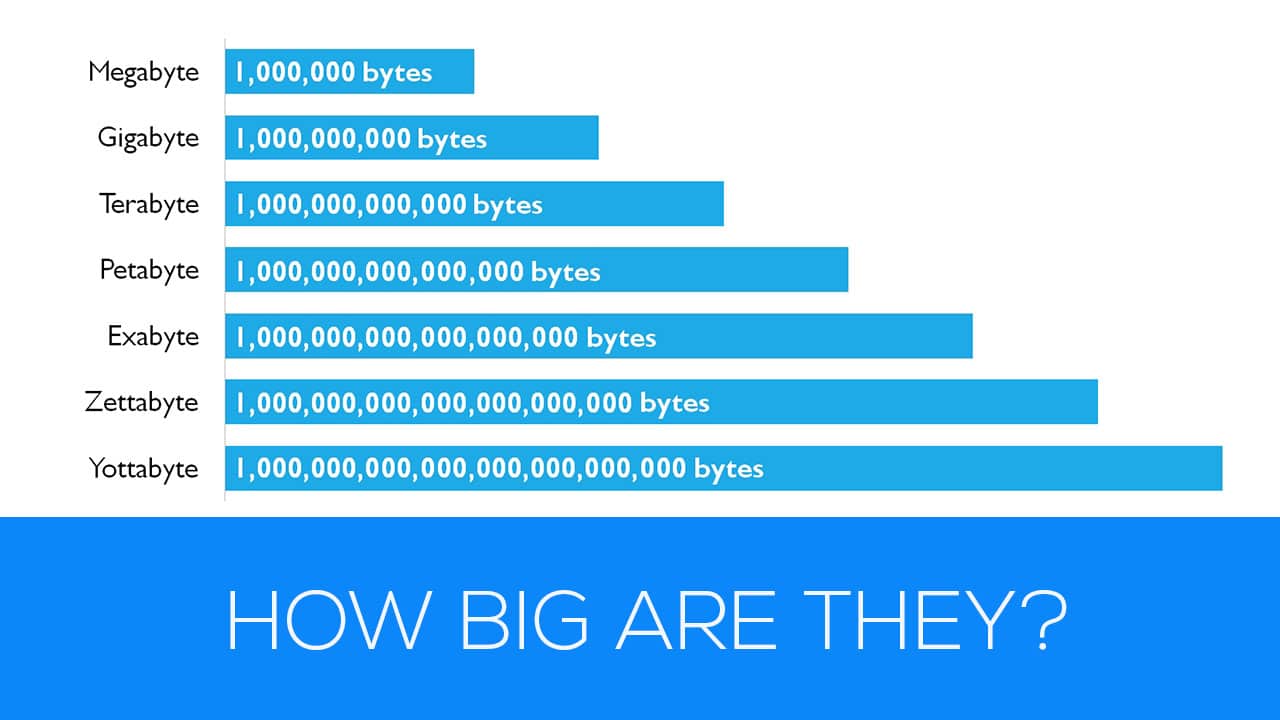
Gigabytes, Terabytes, & Petabytes: How Big are These sizes?


TERABYTES GIGABYTES, PETABYTES
Everything you need to know about Terabytes, Gigabytes, Petabytes and Other Storage Metric terms.
What is a terabyte? How many gigabytes of storage does a device or memory card contain? These are few out of the many questions that come up when a new digital device, hard drive, or memory card is about to be purchased. As common as these data storage metric terms are, it is safe to say that many people still have no clue what they are.
So before you go ahead to purchase a hard drive or flaunt your technological know-how in the face of your friends, it is important that you consider what these metric terms mean, their sizes when compared to one another, and much more. The good news here is, these terms are not as complicated as they sound.
The illustrations contained in this article are simple and soon you’d be an expert in converting these metrics from one to another and also have basic knowledge about what they mean.

WHAT ARE THE DATA STORAGE METRIC TERMS AVAILABLE?

This is a familiar question but for the sake of the newbies, the terms are Exabyte, petabyte, terabyte, gigabyte, megabyte, kilobyte, and byte. Features to note here are the sizes, and common abbreviations. All you need to do to get the right abbreviation is to pick the first letter of the term and add “B” which stands for byte to it, for example, Gigabyte is GB, Terabyte is TB and so on. “Byte” is common to all of these terms because it is the amount of storage space required to accommodate a character of text. You can view it as the “cell” of storage terms, it is quite important.
Well, another term that comes to mind is “bit”. If a byte is a storage space, what then is a bit all about? You can consider it to be smaller than a byte because 8 bits make up 1 byte. Adding more to this simple illustration will probably get you confused, so let’s leave it at that.

WHICH DATA STORAGE METRIC TERM IS THE LARGEST?

It is easy to work this out, all you need to do is determine which is the largest and then work your way down from there. An exabyte is currently the biggest and it followed in a downward progressing manner by petabyte, terabyte, gigabyte, megabyte, kilobyte and then byte. Quite simple isn’t it?
HOW DO I CONVERT SIMPLE DATA STORAGE METRIC TERMS?
Based on how computers work, each storage metric term differs from the next by 1024. This may contradict what you must have heard about this conversions before but it is true and probably the most realistic multiplier that you can use to carry out your calculations.
With that said, 1TB will contain exactly 1024GB, a further breakdown will give 1,048,576MB and so on. This means that you can get the value of 1TB in GB by multiplying it by 1024 and also get the reverse by dividing by 1024 also.
You would notice we didn’t start the conversion with Exabyte; this is because most hard drives and storage devices are currently measured in terms of terabytes, gigabytes, megabytes, and kilobytes. In case you are already asking that question, that should satisfy your curiosity.

Difference between a coder, a programmer, a developer and a software engineer

Difference between a coder,programmer and developer 2
Maybe you have heard about these job titles in the past, but what exactly is the difference between them? Some people claim that it mostly depends on your education and on what you have achieved; in some way, this may be true, but some others claim that sometimes the company you are working for decides if you are a programmer, a developer or other, making it merely a job title. Let’s take a closer look to this.

What is the exact difference Between a coder, a programmer, a developer and a software engineer?

1. Coder

A Coder is a person in charge of writing the code that makes most of our apps run properly. Those who are coders have the ability to create software that can be used not only in apps but also in video games, social media platforms, and many others. Coders sometimes cannot do all the phases required in the making of a software, like designing or testing, they mostly take part only in the phase of writing the base code. In some cases, there are people who may get offended If you call them a coder.

2. Programmer

A Programmer is a bit more specialized person. They are able to create computer software in any primary computer language, like Java, Python, Lisp, etc. Programmers are said to go beyond coders, they may specialize themselves in one area or may even write instructions for a wide variety of systems.
They also understand quite well algorithms. Programmers can be similar to Developers but the ones who implements are not the same as the ones who can design or do a well class structure within the software. They can take care of many details.

3. Developer

A Developer can write and create a complete computer software out of nowhere taking care of the design and other features. They are key for the development of any software applications; they are also experts in at least one programming language. Some people consider them true professionals that can take care of all the generals. Developers can sometimes be more general when it comes to the development of a software, unlike Programmers.

4. Software Engineer

A Software Engineer is an individual that applies the principles and techniques of computer science or software engineering to everything regarding the development of a new independent software; from analyzing what the particular needs of the user are, going through the design, maintenance and testing, and even the final evaluation of the software. They are able to create software’s for any kind of system as operating systems software, network distribution, compilers and so on. They often have a college degree and can prove things theoretically.
Another way for understanding the differences between a Coder, a Programmer, a Developer and a Software Engineer is seeing them as a hierarchy or as stair, where the Coder can be found in the low section of the stair and the Software Engineer can be found at the top. Maybe to you all these job tittles may mean the same because you once knew a Developer that could do everything a Software Engineer can, but there are really some differences between them are worth knowing.
If some companies take special attention in the name of their employees or not, it is not such a big deal to worry about; what really matters is knowing what you can do and how well you can do it.

Friday, 16 June 2017

Is Linux faster than Windows ?

Why Is Linux Faster Than Windows?
One question that comes up a lot in discussion is whether Linux is genuinely a faster OS when compared to Windows. Most of the questions direct us to the time it takes for the OSes to boot up and in that parameter, yes, Linux is noticeable faster than Windows. Why then, does it fail the speed test when compared along other parameters ?
Kernel
One big reason why Linux can boot up faster than Windows is the difference in the way their kernels are designed. The nucleus of an OS is very different in these 2 products. Linux has a monolithic kernel – meaning it holds every core functionality needed by the OS such as drivers ,memory management, task scheduler and the file system. Windows on the other hand contains a micro kernel which contains only the basic necessities and the remaining aspects are loaded separately thus making it a little bit slower when compared to Linux.
Backward Compatibility
This is one aspect wherein Windows suffers owing to the decades of software support it provides it’s users. While it may slow down the loading process, there’s no denying that a majority of the world’s computing needs require this compatibility. Linux on the other hand, being a minority shareholder in the computing world can afford to forgo backward compatibility.
While discussing this, we also need to note that Microsoft can afford for Windows to be slower for the simple reason that a potential user will not be dissuaded from purchasing a Windows license just because it works a little bit slower. Windows being a propriety OS has a limited number of developers and thus a finite number of man hours they can commit. Therefore, the development activities need to be market driven for Microsoft. Optimization is not as high a priority for Windows compared to other requirements.
Linux on the other hand outperforms Windows in many areas because it is essential for its existence.
Explanation From Tech-savvy Reddit user logicalkitten 
  • One of the more hidden benefits to linux is that applications share files better than windows. So instead of DLLs like in windows, linux uses .so files, or “shared objects”. There are also .ko files, which are kernel objects, somewhat like drivers in windows.
  • A Windows application might depend on a very specific version of a DLL. The person who writes the application doesn’t know what version of windows you will be installing it on and if that particular DLL will be present in your system. So the easiest solution is to just include the correct DLL with the application. Effect: installers are much larger, C drive is fuller, and more ram is used.
  • Linux does it differently. When you ask to install Midori web browser for instance, apt-get (or the software center front end) checks the package for a list of dependencies. Instead of including all the files, Midori just says what it depends on.
  • So apt-get checks the system and sees that fileX.so.1 is already installed, which is one of the dependencies, so it doesn’t need to fetch it from the central software repository. It then notices that Midori needs another file, which is not installed yet, so it checks the software repository for a version that matches, or one that is newer. It installs that. And so on. Once the dependencies are satisfied, it installs the application itself. Result: Software can be installed very quickly and doesn’t take up as much space or ram.
  • The apt-get system also keeps track of how many applications need fileX.so.1, so that if you remove Midori, it doesn’t remove fileX.so.1, unless nobody else is using it. So Linux has pretty good house keeping skills.
How many of the ardent Linux supporters would stick around if the OS starts having problems ?

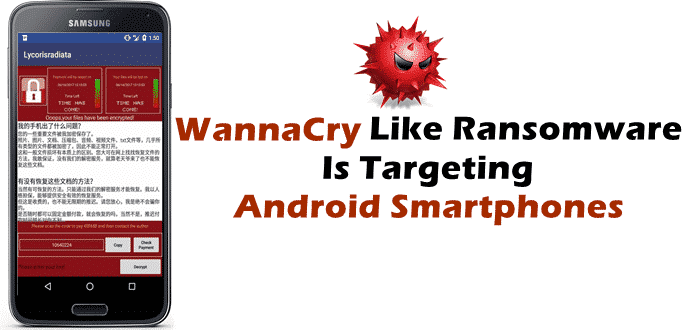
WannaCry lookalike encrypts files on Android smartphones’ external storage

WannaCry Ransomware Lookalike Targeting Android Smartphones
It looks like the WannaCry ransomware has become a source of inspiration for many crooks around the world. We had recently reported how a 14 year-old teenager from Japanimpressed by the malware was arrested last week for developing a malware similar to the WannaCry malware.
Now, cybercriminals in China have developed an Android ransomware that uses similar graphics of WannaCry and trick users into quickly paying the ransom.
For those unfamiliar, WannaCry ransomware exploited a weakness in Microsoft’s Windows operating system and went on to infect more than 3,00,000 computers in 150 countries within 72 hours last month. The WannaCry ransomware cryptoworm encrypted data and demanded payment in virtual currency Bitcoin in exchange for a password to unlock data.
Spotted first by Chinese security firm Qihoo 360 and dubbed as “ WannaLocker ” by Avast, this lookalike version of WannaCry ransomware and is currently targeting Android users living in China. The hackers are spreading this ransomware via Chinese gaming forums where it is disguised as a plugin for the King of Glory, a very popular mobile game in China.
How does the malware work?
Upon installation of this fake add-on in the device, the WannaLocker ransomware hides its app icon from the app drawer and changes the main wallpaper on the infected device to an anime image. Then, it starts encrypting the files stored on the infected device’s external storage.
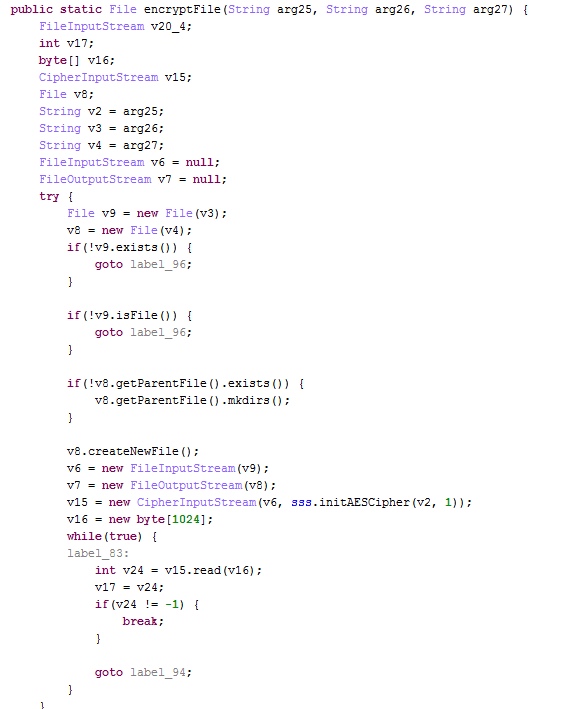
The ransomware uses AES encryption to lock the files (see code below). To prevent corruption and crashing of the Android OS, it doesn’t not encrypt files that begin with a “.”, or files that include “DCIM”, “download”,  “miad”, ”android” and “com.” in the path, or files that are bigger than 10 KB.
Once the encryption process is completed, it demands ransom even less than Simplocker, and uses a ransom message clearly inspired by WannaCry’s note to reveal its orders.
Nikolaos Chrysaidos, head of mobile threat intelligence and security at Avast, explains more in a blog post:
“The ransomware then demands a ransom of 40 Chinese Renminbi, which is equivalent to about 5-6 US dollars. This is not much compared to what other mobile ransomware has demanded in the past. The fact that the ransom is being demanded in regular currency and not in cryptocurrencies makes me think the people behind this are trying to make money, and fast. This is, however, risky as the money can be easily traced, unlike when sending cryptocurrencies.”
The victims of the ransomware are instructed to pay the ransom in regular currency using Chinese payment methods like QQ, Alipay and WeChat.
The sloppy handling of ransom suggests that it could be a work of an amateur hacker or group of hackers. As a result, it is just matter of time for the Chinese authorities to find out who are behind the WannaLocker ransomware and who is receiving the ransom.
Here’s a security advice from Avast for Android users:
To protect your phone and valuable photos, videos, contacts stored on it from ransomware, make sure you frequently backup your data and install antivirus on all of your devices.
Additionally, Android users should refrain from downloading apps on any app marketplaces other than Google Play. In case, you become a victim of a ransom-based attack, don’t give into the ransom demand and seek professional help instead.
Last week, Check Point, an online security firm, had detected a malicious malware called “ Fireball ” that was created by Chinese ad corporation Rafotech that takes control of the user’s web browser and generates fake advertisement clicks and promotions for its clients online. The malware affected more than 250 million computers around the world, with India being the worst hit.
Source: IBT

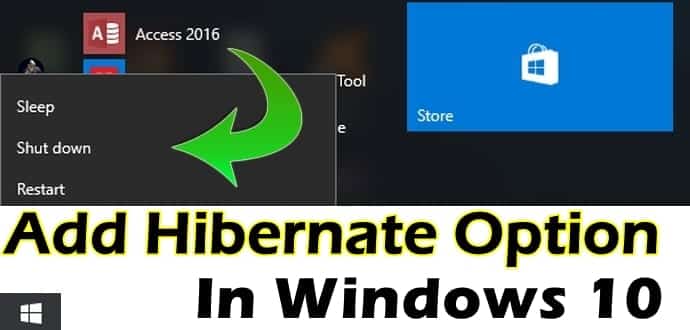
Your Windows 10 PC Doesn’t Have Hibernate Option? Here’s How To Add it!

How To Add Hibernate Option In Windows 10

Your Windows 10 PC Doesn’t Have Hibernate Option? Here’s How To Add it!

Hibernation is a state between a traditional shut down and sleep mode, in which the computer takes a snapshot of your system files and drives before saving it to your hard drive and shutting down. The benefit of hibernating is that it allows your machine to start up faster since it doesn’t need to spend time to re-establish those files and drivers.
Reason for hibernation
Hibernate is not enabled by default and most people do not really use it. However, when it is enabled it generally takes around 75% of your RAM due to the disk space that it reserves. The hiberfil.sys file is the file responsible for the hibernation and is allotted the 75% RAM space. Thus if the total RAM on your machine is 8 GB this file alone will take up 6 GB. Therefore, if you need that RAM it is probably a good idea to have the hibernate mode disabled.
Here’s how to disable hibernation in windows 10:
Step 1:
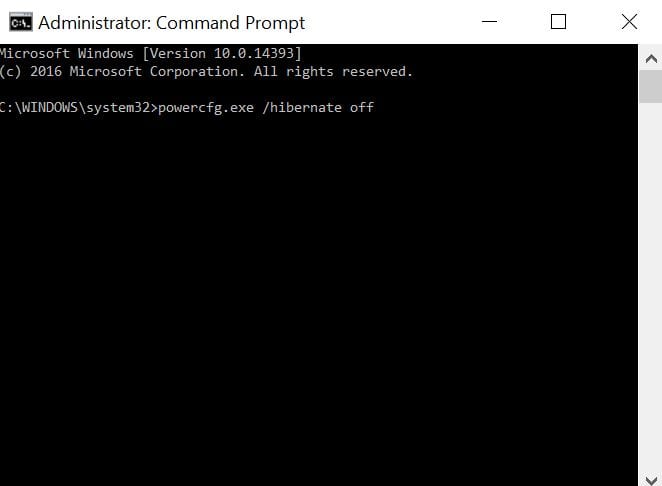
Open up your command prompt by right-clicking on your Start menu.
Step 2:
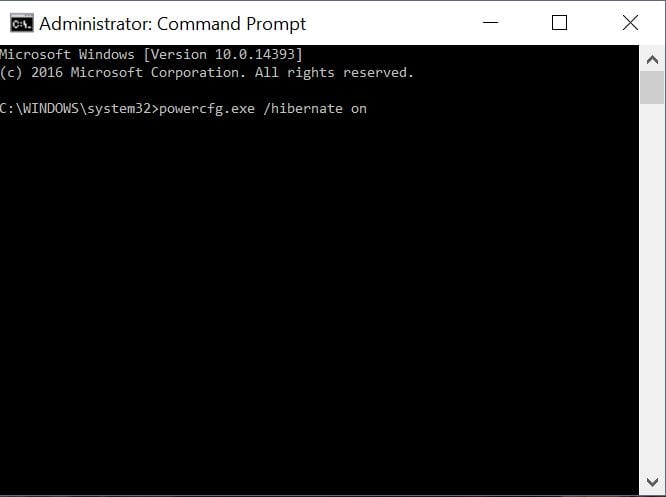
In the command prompt, type the command – powercfg.exe /hibernate off  and hit Enter.
Step 3:
To enable hibernation in windows 10 if you need it, type the command – powercfg.exe /hibernate on in the command prompt and hit Enter.

” Add ” Hibernate option on the Start menu in windows 10

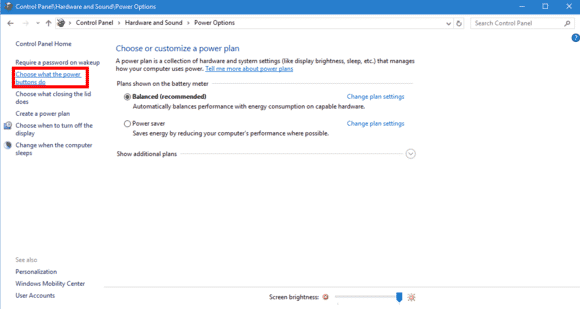
Now if you use hibernate on a regular basis, you might want to add it on your Start menu >power option. To do this, you will need to go into the Control Panel and Find the Power Options. Within that, choose the option in the left that says Choose what the power buttons do. 
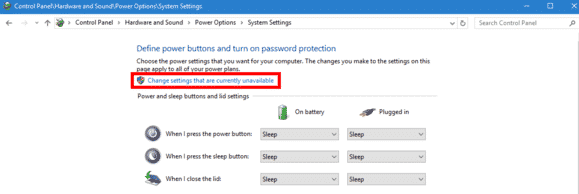
On the next screen, click on the blue link that says Change settings that are currently unavailable.
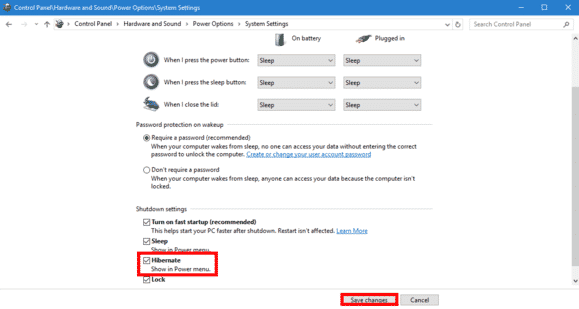
Now scroll down to the bottom half of the page, click the checkbox next to hibernate and save your changes. The Hibernate option will now show up in your Start Menu on your windows 10 when you click the Power button.

Why do most professional programmers prefer Macs?

A Macbook is a great piece of machinery, that’s beyond debate. From the build quality to battery efficiency, there aren’t any machines out there that can compete with a Macbook. That being said, there are questions that come to mind when deciding to purchase a Mac. One of them being – is it a good machine to code on ?
No matter which side you are in the Windows vs Mac debate, its hard to ignore the fact that Macbooks have limitations. From a small user base to limited applications to the higher price point, there are obstacles which do not allow Macbooks to be as widely accepted as a machine running Windows. Though in some cases – such as digital content creation, Macbooks tend to be preferred, coding specifically is a domain that’s fiercely debated. On one hand, I have come across dozens of vocal Macbook supporters while on the other, Windows is clearly the preferred choice when seen by the sheer number of coders on the platform.
Therefore, we’ve decided to delve into the hot topic of discussion – not to find out which one is better – but to see how good a Macbook is for a programmer. Hopefully this article will help those readers who are in a quandary between choosing a Macbook as the primary coding machine.
Hardware
First, let’s discuss hardware. Though not extremely crucial for development, you simply cannot code efficiently on a machine that cannot keep up with you. A programmer may not need a beast of a machine, but one needs to have a machine which has decent raw power. On a hardware comparison, even the most basic Macbook is clearly not a slouch when it comes to performance. On the most expensive side of the Macbook range, the hardware just keeps getting better and better. Many individuals who work on a Mac on a daily basis will also tell you how good a Retina display is. Barring the better colour reproduction and sharp display, most people will also tell you that your eyes won’t hurt after a long day of staring at the screen.
On the flip side though, this hardware also comes at a much steeper price. While a Macbook might be mighty powerful under the hood, it is also mighty high on the price point. In the most common reason to refute a Macbook, Windows machine pride themselves in being able to offer the same raw power in a much more affordable price range. Granted, the Macbook range has a design to die for, but it was only a matter of time before other companies in the fray managed to develop laptops that could go head to head in the design department if not better than the Macbook.
Development Environment
Its needless to say it, but if you’re developing Windows apps, Mac obviously isn’t your best option. With the level of support that Microsoft’s OS has for software development for its own platform, one would be best served for developing Windows apps on a Windows machine. That being said, MacOS does have a native UNIX environment – which is what a majority of web servers use as well. In simpler terms, if the server you will eventually use runs UNIX or Linux, it makes sense to consider developing on a machine that runs on the same environment.  In simpler terms, it means that the applications you develop on a Macbook will run on the machine in the exact same way as they will on the actual server once deployed. Web applications developed using PHP, Ruby on Rails, or Node.js will work exactly as they would on the production server as will MySQL and Postgres.
Tools
The Macbook also has access to the 3 major internet browsers which means testing those aforementioned web apps on these browsers will not be an issue.  As a plus point, the Web Inspector of Apple’s native browser Safari can easily connect to an iOS simulator thus allowing you the benefit of testing these apps on tan iPhone and iPad like interface. For an iOS developer, this is an invaluable plus point.
In respect to other development tools, Macbooks play host to a number of text editors including TextMate, BBEdit, SublimeText, Atom, SubEthaEdit (with Google Docs-like live collaboration features). The Macbook range also has access to specialized developer tools like source control GUIs (Cornerstone and Versions for SVN, Tower and SourceTree for git), file comparison and merge tools (Kaleidoscope), GUI design helpers (xScope), quick-lookup documentation viewers (Dash), and file transfer tools (Transmit). In addition to these if you end up requiring access to a different development environment, there always are Virtual environments to be utilized like  VMware Fusion and Parallels Desktop.
In conclusion, there are several tools available to make Macbook a serious coding machine. For developers switching from a Windows environment, if you find some resources missing, you will also find plenty of alternatives. While the high cost of entry is a major obstacle keeping Macs out of reach for students and younger developers , if you are an experienced developer or can afford a Macbook without much investment in the Windows platform, you should consider making a Macbook your next coding device.

Malware abuses Intel Chip Management Feature to infiltrate


Malware using Intel's tool to evade firewall
Hackers have been known to use creative and innovative ideas to break into a system. However, it is usually by means of deceiving the user and/or exploiting loopholes. This security breach however, happens to the rare scenario when a hacker has utilized a software in the exact way as it was designed to be used to hack into a system.
Bypassing the Firewall
Microsoft has announced that a group going by the name of Platinum has made use of Intel’s Active Management Technology (AMT) to bypass Window’s firewall completely. The tool is available on machines running Intel’s vPro line of processors and chipsets. The group has its own file transfer tool which utilizes – for its communication services – Serial-over-LAN (SOL) channel from within the AMT. This channel has been designed to operate independently of the Operating System running on the machine and therefore, the tool is able to bypass Window’s firewall thus making it ” invisible to firewall and network monitoring applications running on the host device.” 
The Serial-Over-Lan (SOL) channel” exposes a virtual serial device with a chipset-provided channel over TCP” is not enabled by default, and requires administrative privileges to actually run on the target workstations. Since the provisioning of such a channel is bound by the use of user credentials – username and password – the Redmond giant speculates that PLATINUM “might have obtained compromised credentials from victim networks”.
The AMT firmware runs at a low level, below the operating system, and it has access to not just the processor, but also the network interface.The software allows a user to remotely install an OS on a machine that does not have one yet, allows for the power cycling of devices and also provides an IP based KVM (Keyboard,Video,Mouse) solution to enable users to accomplish these tasks.
Statements
This is what Microsoft had to say in a public statement:
We confirmed that the tool did not expose vulnerabilities in the management technology itself, but rather misused AMT SOL within target networks that have already been compromised to keep communication stealthy and evade security applications.
The new SOL protocol within the PLATINUM file-transfer tool makes use of the AMT Technology SDK’s Redirection Library API (imrsdk.dll). Data transactions are performed by the calls IMR_SOLSendText()/IMR_SOLReceiveText(), which are analogous to networking send() and recv() calls. The SOL protocol used is identical to the TCP protocol other than the addition of a variable-length header on the data for error detection. Also, the updated client sends an unencrypted packet with the content “007″ before authentication.
Not everyone needs to be worried about this however, since machines running Windows 10 version 1607 or later and Configuration Manager 1610 or later are deemed protected for this or any other attack by the same means. This system configuration is not only capable of detecting a targeted attack activity but it can also “differentiate between legitimate usage of AMT SOL and targeted attacks attempting to use it as a communication channel.”
The company has also said this is the first attack that has utilized chipset features for its purposes and it does not expose the vulnerabilities of Intel’s AMT software, rather it uses the technology to evade security systems in a complex and compromised network. Microsoft has also released a video alongside the public statement for users to understand how the attack takes shape which you can check out below.
Source: Neowin

PHP vs Python : Which one is the Best Server-Side Programming?

PHP vs Python, the two most popular back-end programming languages. Python has the variety of dynamic features with simple script whereas ...